Using Immo Scout to find an apartment with the help of Python and the Bash
To find a new place to live, Immo Scout is one of the choices that comes into mind when investigating the
real estate market. Depending on the region it may happen that the market is very volatile. Offers that
were online at one day, may have been removed on the day after. Therefore, when you are looking at offers
store the link of the ad, keep it in a list and check whether the URI is still valid.
I personally had a text file with the URI of the ad at one line and additional information on separate
lines. The format did vary. To actually check if an offer is still
online a quick check is done with an HTTP head request. If the HTTP response code is 200, the offer is
still valid. Trying to access ads that have been taken down result in an HTTP response with code 410 GONE.
cat list.txt | grep "https:" | while read i
do t=$(curl -Is $i | grep "200 OK") ; if [[ "$t " != " " ]]; then echo $i; fi
done
This prints out all URIs that are still valid. The problem that remains here is that you manually need to clear your file from obsolete URIs. The good part is that the list of URIs remains in the same order as they are in the original file.
Fetch details of an ad
To actually fetch the details of an ad I wrote a small python script, that is fed with the URI to the ad, fetches the HTML and tries to extract information of the apartment or house. The output can be written to a csv file that in turn can be used in a spreadsheet to have a nice table.
#!/usr/bin/env python3
# -*- coding: utf-8 -*-

"""
This script fetches information about real estate object from immoscout.
The argument can be one or more urls to a single object for rental or
sale. Instead of an url also a local file can be provided that contains
the content of a url to an object.

The following arguments can be provided:
-f format    the output format of the data. By default this is json.
             Other formats are gpx and csv.
-o filename  name of the file where to write the output. If no file is
             given, the output is written to stdout.
"""

import urllib.request
import sys
import re
from os.path import exists
from lxml import etree
from io import StringIO

def fetchUrlAndParse(url: str) -> etree.ElementTree:
    if exists(url):
        f = open(url, "r")
        html   = f.read()
        data   = StringIO(html)
    else:
        opener = urllib.request.build_opener()
        opener.addheaders = [('User-agent', 'Mozilla/5.0 (X11; Ubuntu; Linux x86_64; rv:78.0) Gecko/20100101 Firefox/78.0')]
        html = opener.open(url).read()
        data   = StringIO(html.decode('utf-8'))

    parser = etree.HTMLParser()
    tree   = etree.parse(data, parser)
    return tree

def fetchPageData(url: str) -> dict:
    tree = fetchUrlAndParse(url)
    factsheet = {}
    address = ''
    name = ''
    point = None
    link = url
    for table in tree.xpath('//table[contains(@class, "DataTable")]'):
        for tr in table.xpath('.//tr'):
            tds = tr.xpath('.//td')
            if len(tds) > 1:
                key = tds[0].text.strip() if tds[0].text is not None else ''
                if len(key) > 0:
                    val = tds[1].text.strip() if tds[1].text is not None else ''
                    factsheet[key] = val
    for h2 in tree.xpath('//h2'):
        if h2.text is not None and h2.text.strip() == 'Standort':
            address = etree.tostring(h2.getnext()).decode("utf-8").strip().replace('<br/>', '\n')
            address = re.sub('<[^<]+?>', '', address)
            break
    name = tree.xpath('//title')[0].text.strip()
    for a in tree.xpath('//a'):
        link = a.attrib['href']
        if link.find('maps') > -1:
           link = link[link.find('q=') + 2:]
           loc = link.split(',')
           if len(loc) == 2:
               point = {'lat': float(loc[0]), 'lon': float(loc[1])}
           break
    for l in tree.xpath('//link[@rel="canonical"]'):
        link = l.attrib['href']
        break

    return {
        'url': link,
        'name': name,
        'loc': point,
        'address': address,
        'facts': factsheet
    }

def formatGpx(output):
    gpx = '<?xml version="1.0" encoding="UTF-8" standalone="no" ?>' \
    '<gpx version="1.1" creator="canjanix.net">' \
    '<metadata> <!-- Metadaten --> </metadata>'
    for obj in output:
        gpx += '<wpt lat="%f" lon="%f"><src>%s</src><name>%s</name><desc>%s</desc><cmt>[CDATA[%s]]</cmt></wpt>' % \
            (obj['loc']['lat'], obj['loc']['lon'], obj['url'], obj['name'], obj['address'], obj['facts'])
    gpx += '</gpx>'
    return gpx

def formatCsv(output, delimiter = '|'):
    import re
    regex = re.compile(r"\r?\n", re.MULTILINE)
    cols = ['url', 'name', 'lat', 'lon', 'address'] # collect all possible column names
    for obj in output:
        for key in obj['facts'].keys():
            if key not in cols:
                cols.append(key)
    csvData = delimiter.join(cols) + "\n"
    for obj in output:
        for x in range(0, len(cols) - 1):
            k = cols[x]
            if k == 'lat' or k == 'lon':
                value = str(obj['loc'][k])
            elif k in ['url', 'name', 'address']:
                value = re.sub(regex, ' ', obj[k]).replace(delimiter, ' ')
            else:
                try:
                    value = re.sub(regex, ' ', obj['facts'][cols[x]]).replace(delimiter, ' ')
                    if (value == ''):
                        value = 'x'
                except KeyError:
                    value = ''
            csvData += value + delimiter
        csvData = csvData[0:-1] + "\n"
    return csvData

def main():
    urls       = []
    outputFmt  = 'json'
    outputFile = None
    currentArg = ''
    for i in range(len(sys.argv)):
        if i == 0:
            continue
        arg = sys.argv[i]
        # we have a command identified by - remember it in currentArg
        # in case this command needs an argument, or just set the
        # appropriate variable if this is a switch only.
        if arg == '--help':
            print(__doc__)
            sys.exit(0)
        elif arg[0:1] == '-':
            if arg in [ '-f', '-o' ]:
                currentArg = arg
            else:
                print('Invalid argument %s' % arg)
                sys.exit(1)
        elif len(currentArg) > 0:
            if currentArg == '-o':
                outputFile = arg
            else:
                if arg in [ 'json', 'gpx', 'csv' ]:
                    outputFmt = arg
                else:
                    print('Invalid argument %s' % arg)
                    sys.exit(1)

            currentArg = ''
        else:
            urls.append(arg)
    # argument processing is done here
    output = []
    for url in urls:
        data = fetchPageData(url)
        output.append(data)

    if outputFmt == 'gpx':
        output = formatGpx(output)
    elif outputFmt == 'csv':
        output = formatCsv(output)
    if outputFile is not None:
        print(output, file=open(outputFile, 'w+'))
    else:
        print(output)

if __name__ == "__main__":
    main()
The script can be used with several urls at once. The output is written to stdout or in a file given
by the argument -o. This is quite useful when you use the -f argument to format the output as csv
or gpx and you wish to collect information of several objects at once.
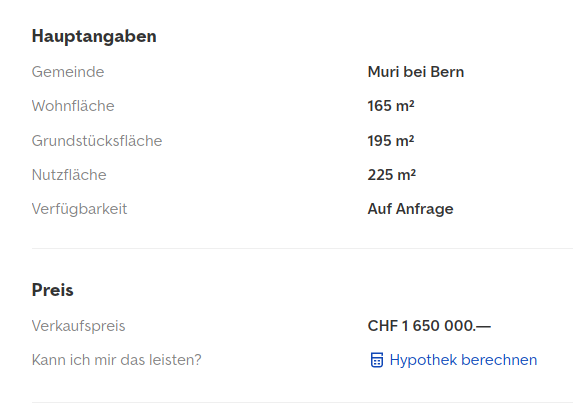
There are several tables that have a class DataTable. Inside the table we look at the table rows and
there at the first and second table cell (td element). The data is stored in a dictionary, the key is
the left cell, the value is the right cell. Apart from the dictionary that contains all the facts of the
real estate from the table, we collect some information that is scattered around elsewhere in the page.
This is the title of the ad, the location (geo coordinates) and the canonical URL.
The gpx output is good when you need to export the geographic locations and want to import them into a GPS device. This makes navigation easier when you have them as targets in your device already and don't need to type in the address.
The CSV export must join all possible dictionary keys from all objects into one list and use them as the column header. If an object did not have a key defined, this cell remains empty.
I tested the script on the immoscout24.ch site. The german Immo Scout24 looks a bit different in its layout. Therefore, the Python script above would not fetch all information correctly. Furthermore, when running this script an HTTP 405 response is returned. Immo Scout tries to make screen scrapping difficult. Therefore, they also do not use any elements of structured data on their page.
There is a nice project at https://pypi.org/project/immoscrapy/ that tries to query Immo Scout. However, I didn't try this one out yet.