Timeline bar chart with javascript
For quiz questionnaires it's more appealing if the questionnaire comes in a nice layout, or if the layout transports additional information in contrast to have just a list of questions with multiple choice, freetext answers or some kind of assignments of possible answers.
When it comes to questions that have a timeline aspect in it (e.g. certain date when the event happened or time frame when something took place), a timeline chart seems to be suitable to visualize the events within the timeline. Therefore, I developed a simple online tool that helps me to create horizontal bars that represent a certain time frame. You may know these charts as gant charts, which are used to display the effort of time a task will take and also the dependencies in planning, when a task must be finished before another task may start.
A typical timeline chart that could be used in a questionnaire is this one:
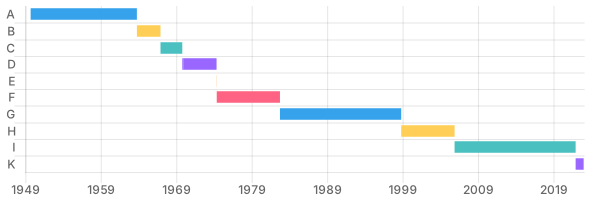
For each bar, name the german chancellor that served in that time that is displayed by the bar.
There are many more possible questions of this type. The work to create the chart is similar for those and very repetitive. Therefore, we try to automate the creation of these charts. This was the reason that I created this timeline bar chart tool.
Launch it here: Tool Timeline bar chart
To get to the chart displayed above, you may type the dates and the label from each chancellor in a line and press the plus button.
CSV
If you have the dates already in a spreadsheet or some other format, you may convert it into a CSV. Then click the "C" button, the textarea for the CSV data appears, and you may fill it in via copy and paste.
A sample CSV for the data above looks like this:
itemLabel,start,end
A,1949-09-15,1963-10-15
B,1963-10-16,1966-12-01
C,1966-12-01,1969-10-21
D,1969-10-22,1974-05-07
E,1974-05-07,1974-05-16
F,1974-05-16,1982-10-01
G,1982-10-01,1998-10-26
H,1998-10-27,2005-11-22
I,2005-11-22,2021-12-08
K,2021-12-08,2022-12-31
When you click the "+" button, the CSV data is parsed and the chart is created.
SPARQL
A more elegant way is to get the data from some source and not to type it manually. The german chancellors exist all on Wikipedia and therefore, can be fetched via the SPARQL endpoint at wikidata. To automate this, the timeline bar chart tool has a possibility to send SPARQL queries. The endpoint can be defined as well, the default goes to wikidata. To enter your query, click the "Q" button, a textarea opens where you may add your query string. Afterwards hit the "+" button to send the query, receive the data and to build the chart. From the result set, each row is examined. The first textual value will be used as the label, the first two date time values will be used as start and end date. The dates are automatically sorted so that the earlier date will be used as the start date and the later date as the end date, so you may mix the sequence dates in the select statement.
SELECT ?itemLabel ?start ?end WHERE {
  ?item p:P39 ?position .
  ?position ps:P39 wd:Q4970706 .
  ?position pq:P580 ?start.
OPTIONAL { ?position pq:P582 ?end. }
SERVICE wikibase:label { bd:serviceParam wikibase:language "[AUTO_LANGUAGE],de". }
}
ORDER BY ?start
Here we ask for items that have the property position held of the object Federal Chancellor of Germany. That returns the chancellors. The time in service has a start time and an end time that we need in the output. The optional end time is important otherwise the current serving chancellor would be missing.
What this query lacks is that the name is printed instead of a placeholder. I cheated in the way that I run the query at the official wikidata SPARQL endpoint, downloaded the result as a CSV file, replaced the name by the letter, and added and "end date" for the current chancellor in service. The last step was necessary to import that line as well, because otherwise there would be one date in the data set only, hence no timeline with start and end date could be created.