Speedtest of downloads at your internet connection
Some days ago my neighbour complained about his internet speed. The web radio stopped working sometimes. He could call a technician which he has to pay if the fault is on his side. The internet provider would pay them if the reason of lack of connection is on theirs. Most of us know that a broken internet connection on a device with a wifi connection may have several reasons. Therefore, we (the neighbour and me) wanted to test the connection of the line itself.
Thinking of how to do this, I could write a little Python script that access several urls, reads the content and then measures the time when the content transfer has finished. This may not an exact measurement but gives an idea of how the job could be done. My first check was to see if I could take a ready to use program. The search revealed pyspeedtest. This sounded good (without even writing a program myself) but I still had another problem to solve. Although I do like fortifying my Python skills, the neighbour has Windows machines only. My idea of Python was because Python has got installers for Python2 and Python3 that are easy to use and get Python running on Windows. There would be then no problem to get a python program running. However, if the script needs additional packages or if it's a script like the one above, that needs to be installed via pip things get more complicated. I was hesitating to head in this direction. That is why I started writing my own script although knowing this would not be as exact as pyspeedtest. The additional problem that remains is that I only test the down stream and not the upstream, because I download stuff only instead of performing an upload as well.
The idea of the script is to use some urls, transfer the content (without actually storing it) and measure the time when the download has finished. This procedure is repeated after some period of time to have a variety of downloads. That lets us calculate an average value, and I avoid single issues, that influence the measurements and may return a wrong result. Such an issue could be a higher server load at a certain time, so that the server delivers a delayed and slower response. After the given test urls have been crawled the script is suspended for the remaining time until the next test can start.
I wanted to have all necessary parameters configurable by the command line interface so that the script content doesn't have to be changed if parameters change. Also, I need the result data in a neat form for further processing, e.g. to calculate the average access times from the data points or even draw a line chart. This script also works with big files, e.g. to simulate a download of a 1GB file. Therefore, the data is read in chunks and the data length is summarized. All the measured data is written to stdout and more detailed into a csv file.
Measure the access times
A very simple test may be started like this (script is listed below):
./speedtest.py -u https://www.google.de https://www.spiegel.de -t 5m
The csv file then may contain the following output:
Sun, 21 Jun 2020 18:51:26 +0200|0|https://www.google.de|11877|0.14916706085205078|79622.13596056594|
Sun, 21 Jun 2020 18:51:26 +0200|0|https://www.spiegel.de|761104|0.2755708694458008|2761917.4752783286|
Sun, 21 Jun 2020 18:56:27 +0200|0|https://www.google.de|11843|0.1502528190612793|78820.48452728156|
Sun, 21 Jun 2020 18:56:27 +0200|0|https://www.spiegel.de|760496|0.30182647705078125|2519646.4121736055|
Sun, 21 Jun 2020 19:01:26 +0200|0|https://www.google.de|11837|0.17667579650878906|66998.42442431636|
Sun, 21 Jun 2020 19:01:27 +0200|0|https://www.spiegel.de|763538|0.476121187210083|1603663.143986696|
Sun, 21 Jun 2020 19:06:26 +0200|0|https://www.google.de|11850|0.1680920124053955|70497.10352340117|
Sun, 21 Jun 2020 19:06:26 +0200|0|https://www.spiegel.de|763847|0.4030027389526367|1895389.1032729975|
Sun, 21 Jun 2020 19:11:26 +0200|0|https://www.google.de|11883|0.18934226036071777|62759.364852630264|
Sun, 21 Jun 2020 19:11:26 +0200|0|https://www.spiegel.de|768387|0.33119845390319824|2320019.888210535|
Sun, 21 Jun 2020 19:16:25 +0200|0|https://www.google.de|11862|0.12786412239074707|92770.3547970263|
Sun, 21 Jun 2020 19:16:26 +0200|0|https://www.spiegel.de|762503|0.27374839782714844|2785415.388920243|
Sun, 21 Jun 2020 19:21:25 +0200|0|https://www.google.de|11835|0.1823420524597168|64905.488560378035|
Sun, 21 Jun 2020 19:21:25 +0200|0|https://www.spiegel.de|757995|0.2731928825378418|2774578.1403913586|
Sun, 21 Jun 2020 19:26:25 +0200|0|https://www.google.de|11884|0.169586181640625|70076.46427928738|
Sun, 21 Jun 2020 19:26:25 +0200|0|https://www.spiegel.de|757978|0.3054485321044922|2481524.4479246675|
Sun, 21 Jun 2020 19:31:24 +0200|0|https://www.google.de|11882|0.2663083076477051|44617.45900814519|
Sun, 21 Jun 2020 19:31:24 +0200|0|https://www.spiegel.de|758038|0.27243995666503906|2782403.907558966|
Everyone knows Google, the Spiegel is a weekly print magazine in Germany. The data transferred from these two sites is little. In theory the transfer speed might be a lot higher if there would be a big file to be downloaded. You may test this by downloading an iso image of your favorite Linux distro or something alike. I did not want to cause a lot of traffic, so I have chosen these two urls.
Calculate the average
To calculate the average of the "downloads" the csv lines must be separated by the urls. This is done by some shell tools together with awk:
# Google
cat speedtest.csv | \
 grep google | \
 cut -d\| -f5 | \
 awk '{ sum+=$1; cnt++} END {print sum / cnt}'
The csv file will be grepped for the Google entries only (likewise use "spiegel" for the Spiegel lines), then the
5th column is extracted that contains the download time in seconds. The awk summarized the first (and only) output of
each line, at the same time also counts the lines and finally divides the sum by the line count. In case there are
lines that contain an error, because the connection could not be established or there was a network outage then
these lines need to be omitted from the calculation. This can be done with an additional grep right after the cat
command, that filters lines with no error. These lines have the error code 0 and can be filtered like grep "|0|".
Here we can see that apparently the Google server(s) seem to be "faster", or my provider has a better Internet connection to Google as to the Spiegel, or that geographically the Google servers are located closer to me than the ones from the Spiegel. Whatever it is, this is not so important. Note that there are differences of the access times in different urls, hence I have to use several urls in my tests to actually get an idea on how fast the connection is.
Visualize the data
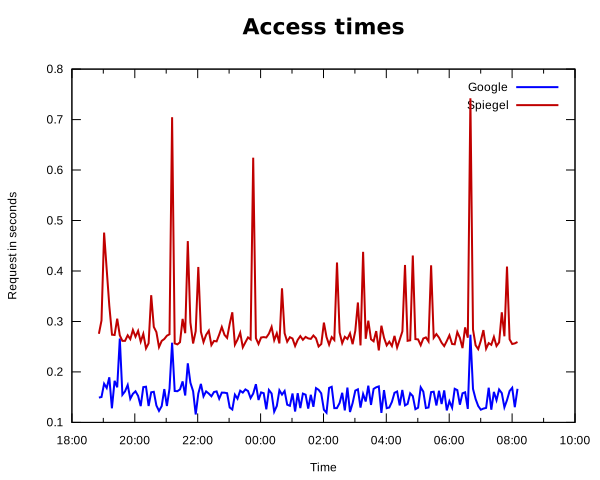
This chart (which contains some more data, from Sunday evening till Monday morning) was created with gnuplot. The
data is taken from the csv file, but we first need to separate the Google and Spiegel lines and store these into two
different files.
cat speedtest.csv | grep google | sed 's/, /|/g' > google.csv
cat speedtest.csv | grep spiegel | sed 's/, /|/g' > spiegel.csv
What needs to be done (as I discovered later), the time format of the first column needs to be changed. Although
the documentation of gnuplot 5.2 says that it
would understand this time format, I had problems with the day abbreviations that should be treated with %a according
to the documentation. Therefore, I replaced the ", " with a pipe, resulting in an additional column before the date,
that contains the day abbreviations only. Anyway, the date string is sufficient to build a correct date without having
the name of the day.
This is how the definition file for gnuplot looks like. I stored it in speedtest.plot
set title 'Access times' font 'Verdana bold,22'
set term svg
set datafile separator "|"
set autoscale
set output 'speedtest.svg'

set xdata time
set timefmt '%d %b %Y %H:%M:%S' # Sun, 21 Jun 2020 19:06:26 +0200
set format x "%H:%M"
set xlabel 'Time'
set ylabel 'Request in seconds'

# line colors
set style line 1 lc rgb '#0000ff' lw 2 # Google
set style line 2 lc rgb '#c00000' lw 2 # Spiegel

plot 'google.csv' using 2:6 with lines ls 1 t 'Google',\
     'spiegel.csv' using 2:6 with lines ls 2 t 'Spiegel'
The command gnuplot speedtest.plot creates the chart in the file speedtest.svg in the same directory. So you
don't even need to use a spreadsheet application to visualize the data, shell tools from the GNU software universe
will do the job as well.
The Python script for the measurement
The speedtest.py script to take the measurements looks like this:
#!/usr/bin/python3

"""
This script tests internet accessibility and measures download speed. A
list of urls can be provided that will be accessed and the contents will
be downloaded. Access and download time is measured and recorded.
The measurements are written to a csv file. By default then name of the
output file is speedtest.csv. The data in the csv file contains the
following columns:
1: date and time when the request was started
2: error code (0 = success, 1 = connection error)
3: url
4: size of transfered data in bytes
5: time of duration in seconds
6: transfer speed in bytes per second
For each single url request one line is written.

The following arguments can be provided:
-d X               delimiter of the csv file, by default this is a pipe "|".
-o csvfile         name of the csv file where to write the measurements.
-q                 quiet: no output at stdout.
-r                 run once only, use this when test command is in crontab.
-t X[smh]          interval in seconds when the tests are executed. X is
                   a positive integer and the lower case letter stands for
                   the unit where s=seconds, m=minutes, h=hours. An integer
                   without unit is treated as seconds.
-u url1 [url2 ...] add test urls that will be accessed in the test loop.

"""

import time
import urllib.request
import math
import sys


def downloadUrl(url):
    start = time.time()
    length = 0
    speed = 0.0

    try:
        chunkSize = 1024 * 256
        fp = urllib.request.urlopen(url)
        while True:
            data = fp.read(chunkSize)
            length += len(data)
            if not data:
                break
        msg = "success got {0} bytes".format(length)
        err = 0
    except:
        msg = "error downloading {0}".format(url)
        err = 1

    end = time.time()
    duration = end - start
    speed = length / duration

    return start, end, duration, length, speed, msg, err

def run(testUrls, interval, runOnce=False, verbose=True, csvFile='speedtest.csv', csvDelimiter='|'):
    startIteration = time.time()
    for url in testUrls:
        if verbose:
            print("{0} start testing {1}".format(
                time.strftime('%Y-%m-%d %H:%M:%S'),
                url
            ))
        s, t, d, l, w, m, c = downloadUrl(url)
        if verbose:
            print("{0} end testing {1} | duration {2} | {3}".format(
                time.strftime('%Y-%m-%d %H:%M:%S'),
                url,
                d,
                m
            ))
        with open(csvFile, 'a') as fp:
            fp.write('{1}{0}{2}{0}{3}{0}{4}{0}{5}{0}{6}{0}\n'.format(
                csvDelimiter,
                time.strftime("%a, %d %b %Y %H:%M:%S %z", time.localtime(s)),
                c,
                url,
                l,
                d,
                w
            ))

    if runOnce:
        return
    remaining = math.floor(interval - (time.time() - startIteration))
    if remaining > 0:
        time.sleep(remaining)

def main():
    """Evaluate command line arguments and run test loop."""

    # run once only and not in an endless loop
    runOnce = False
    # interval in seconds how often the urls are called.
    interval = 60
    # list with test urls
    testUrls = []
    # verbosity (default true, switch of with -q)
    verbose = True
    # output to csv
    csvFile = 'speedtest.csv'
    csvDelimiter = '|'

    # lool at the command line args and evaluate them
    for i in range(len(sys.argv)):
        if i == 0:
            continue
        arg = sys.argv[i]
        # we have a command identified by - remember it in currentArg
        # in case this command needs an argument, or just set the
        # appropriate variable if this is a switch only.
        if arg == '--help':
            print(__doc__)
            sys.exit(0)
        elif arg[0:1] == '-':
            currentArg = ''
            if arg == '-q':
                verbose = False
            elif arg == '-r':
                runOnce = True
            elif arg in [ '-d', '-o', '-t', '-u' ]:
                currentArg = arg
            else:
                print("Invalid argument %s" % arg)
                sys.exit(1)
        # we have an argument, what was the previous command, do this
        # action in the worklog.
        elif len(currentArg) > 0:
            if currentArg == '-u':
                testUrls.append(arg)
            elif currentArg == '-t':
                unit = arg[-1:]
                if unit in ['s', 'm', 'h']:
                    try:
                        interval = int(arg[0:-1])
                    except:
                        print('Invalid value for {}: {}'.format(currentArg, arg))
                        sys.exit(1)
                    if unit == 'm':
                        interval = interval * 60
                    elif unit == 'h':
                        interval = interval * 3600
                else:
                    try:
                        interval = int(arg)
                    except:
                        print('Invalid value for {}: {}'.format(currentArg, arg))
                        sys.exit(1)
            elif currentArg == '-o':
                csvFile = arg
            elif currentArg == '-d':
                csvDelimiter = arg
    # end of evaluating the command line arguments
    # if we don't have any urls set, quit right away
    if len(testUrls) == 0:
        print('No test urls defined')
        sys.exit(1)

    if runOnce:
        run(testUrls, interval, runOnce, verbose, csvFile, csvDelimiter)
    else:
        while True:
            run(testUrls, interval, runOnce, verbose, csvFile, csvDelimiter)

if __name__ == '__main__':
    main()