Football players and their age
Some time ago I was having a conversation with a mother that stated the claim, children earlier born in the year a more likely to have a great football career than people that are born later in the year. It's obvious to me that especially in children development you can easily see a difference of half a year. Two pupils in the same class, one born in January and the other born in August have a difference of 7 months in age. This might come with a difference in physical (e.g. height) and mental development. The differences are smaller the older the people become, but is still notable during primary school.
However, is this true as well for football players? Some children start as early as 7 or 8 to be discovered by a scout and enter the youth training at a football school that is associated with one top club. So that claim might be true. But it needs to be verified.
To get proof of this claim I need to get some data to verify or deny the fact. The idea is to use the 5 top leagues in Europe, take all players that currently play for one of the clubs that are in these leagues and use the birthdays of these players to check the claim. If a player is as good to play in a club that is in one of the top leagues he must have some talent. He probably also started very early in his life to play football and is one of the best in the vast amount of children that start to show interest and play football when they are young.
Fetch player data
Data of football players can be found at the Wikipedia however it's some tremendous work. There is another site named fussballdaten.de that has information about the leagues, each team that is currently part of the league and of course the players that are currently contracted by the teams.
The first thing is to fetch the data from the website fussballdaten.de. I use a python script for that task. The entry point at the website is the homepage for each league. These are:
At each page there is a current table of the teams that are playing in this season. From the links to the teams there are links to the current contracted players of that team. For the statistics of the players age all necessary information is contained at a players page e.g. https://www.fussballdaten.de/person/craig-cathcart/. However, via the league and the clubs we get to all player pages that are relevant for the selection as we defined above. So there is a hierarchy of entities, the league being the highest entity. From the league we get to the teams that currently are part of that league. Each team (or football club) has a bunch of players that play for them. Therefore, I divided the script in three parts using classes that represent these entities. Each class starts with a link where to fetch the information from the website, a logic to parse the page content and a method to put the information into a CSV like format. Also, the entities of a higher level as a player can initiate instances of the class of the next lower entity.
To parse a webpage I decided to use the lxml library with xpath expressions. This is a very accurate way to formulate rules where to look for information in the html of the page. Also, if xpath expressions have been chosen carefully there is a great chance that the script will still work even if there are changes on the website. You can be totally independent on the layout if there is a chance to use structured data. The site fussballdaten.de makes use of structured data of schema.org that we can parse. However, to retrieve some data of a football player (birthday, nationality) we need to parse the page of a player, because unfortunately this information is not contained in the structured data but kept in the html of the page itself. Whenever it's possible structured data is the way to go because that makes you independent on any layout changes.
Structured data from schema.org can be embedded in different ways in a webpage. There are special attributes in html elements (Microdata or RDFa) or as JSON-LD embedded into script tags at the page. Fussballdaten.de uses JSON-LD. There can be more blocks of JSON-LD within one html page. The site hierarchy (e.g. Breadcumb) is also defined in such a block.
This is the JSON-LD of a player:
<script type="application/ld+json">{
    "@context": {
        "@vocab": "http://schema.org/"
    },
    "@type": "Person",
    "birthDate": "2001-02-27",
    "https://schema.org/familyName": "Unbehaun",
    "https://schema.org/gender": "male",
    "https://schema.org/givenName": "Luca",
    "https://schema.org/mainEntityOfPage": "https://www.fussballdaten.de/person/luca-unbehaun-398503/",
    "https://schema.org/name": "Luca Unbehaun",
    "https://schema.org/url": "https://www.fussballdaten.de/person/luca-unbehaun-398503/"
}</script>
All the players are actually listed in JSON-LD on the club page, however the nationality is not defined there therefore I need to fetch and parse each player page.
The JSON-LD is, as the name reveals it already, some JSON that can be parsed. The script makes use of it to lookup all script nodes that have the attribute type with value "application/ld+json" and takes the content text as a whole string and tries it to decode with a json decoder. The result should be some dictionary.
#!/usr/bin/env python3
# -*- coding: utf-8 -*-

"""
Fetch a list of all players of one league from fussballdaten.de. The league name must be provided
as the first argument. The league can be one of:
* bundesliga
* premierleague
* laliga
* seriea
* ligue1

The output is printed to stout as CSV with | as the delimiter.
"""

import urllib.request
import sys
import json
import time
from lxml import etree
from io import StringIO


def fetchUrlAndParse(url: str) -> etree.ElementTree:
    html   = urllib.request.urlopen(url).read()
    data   = StringIO(html.decode('utf-8'))
    parser = etree.HTMLParser()
    tree   = etree.parse(data, parser)
    return tree

def getAbsoluteUrlFromLink(source: str, link: str) -> str:
    if link[0:1] == '/':
        p = source.find('/', 10)
        if p > -1:
            return source[0:p] + link
    return source + link

class fdPlayer:

    def __init__(self, url):
        self.url = url
        self.firstname = ''
        self.lastname  = ''
        self.country   = ''
        self.birthday  = ''
        self.position  = ''

    def fetch(self):
        if self.lastname != '' or self.firstname != '':
            return
        tree = fetchUrlAndParse(self.url)
        for ldJson in tree.xpath('//script[@type="application/ld+json"]'):
            try:
                schema = json.loads(ldJson.text)
                if schema['@type'] == 'Person':
                   self.lastname = schema['https://schema.org/familyName']
                   self.firstname = schema['https://schema.org/givenName']
                   self.birthday = schema['birthDate']
                   break
            except:
                print('error fetching schemadata in ' + self.url)
        tdata = {}
        for table in tree.xpath('//div[contains(@class, "person-daten")]'):
           n = 0
           dds = table.xpath('//dd')
           for dt in table.xpath('//dt'):
               k = dt.text.strip()
               v = dds[n].text.strip()
               tdata[k] = v
               n += 1
        self.country = tdata['Land:']
        self.position = tdata['Position:']

    def toList(self) -> list:
        return [self.url, self.firstname, self.lastname, self.birthday, self.country, self.position]

class fdTeam:

    def __init__(self, url):
        self.url     = url
        self.name    = ''
        self.players = []

    def fetch(self):
        if self.name != '' or len(self.players) > 0:
            return
        url    = (self.url + '/' if self.url[-1:] != '/' else self.url) + 'kader/'
        tree   = fetchUrlAndParse(url)
        for ldJson in tree.xpath('//script[@type="application/ld+json"]'):
            try:
                schema = json.loads(ldJson.text)
                if schema['@type'] == 'SportsTeam':
                   self.name = schema['legalName']
                   break
            except:
                print('error fetching schemadata in ' + self.url)
        # we want these players only, no managers
        scopes = {'Torwart', 'Abwehr', 'Mittelfeld', 'Angriff'}
        processed = set()
        for scope in tree.xpath('//h2'):
            if scope.text.strip() in scopes:
                for a in scope.xpath('./following-sibling::div[@class="content-tabelle"][1]//a[contains(@href, "person")]'):
                    link = a.attrib['href']
                    if link not in processed:
                        processed.add(link)
                        self.players.append(fdPlayer(getAbsoluteUrlFromLink(self.url, link)))

    def toList(self) -> list:
        return [self.url, self.name]

class fdLeague:

    def __init__(self, url):
        self.url   = url
        self.name  = ''
        self.teams = []

    def fetch(self):
        if self.name != '' or len(self.teams) > 0:
            return
        url   = (self.url + '/' if self.url[-1:] != '/' else self.url) + 'tabelle/'
        tree  = fetchUrlAndParse(self.url)
        for ldJson in tree.xpath('//script[@type="application/ld+json"]'):
            try:
                schema = json.loads(ldJson.text)
                if schema['@type'] == 'BreadcrumbList':
                   self.name = schema['itemListElement']['item']['name']
                   p = self.name.find(' - ')
                   if p > -1:
                       self.name = self.name[0:p]
                   break
            except:
                print('error fetching schemadata in ' + self.url)
        table = tree.xpath('//table[contains(@class, "lh2")]')
        processed = set()
        if len(table) > 0:
            for a in table[0].xpath('//tr//a'):
                link = a.attrib['href']
                if link not in processed:
                    processed.add(link)
                    self.teams.append(fdTeam(getAbsoluteUrlFromLink(self.url, link)))

    def toList(self) -> list:
        return [self.url, self.name]

def main():
    try:
        argv = sys.argv[1]
    except IndexError:
        print('No league provided, see --help for more details.')
        sys.exit(1)
    if argv == '--help':
        print(__doc__)
        sys.exit(0)
    elif argv == 'bundesliga':
        link = 'https://www.fussballdaten.de/bundesliga/'
    elif argv == 'premierleague':
        link = 'https://www.fussballdaten.de/england/'
    elif argv == 'laliga':
        link = 'https://www.fussballdaten.de/spanien/'
    elif argv == 'seriea':
        link = 'https://www.fussballdaten.de/italien/'
    elif argv == 'ligue1':
        link = 'https://www.fussballdaten.de/frankreich/'
    else:
        print('invalid league, see --help for more details.')
        sys.exit(1)

    league = fdLeague(link)
    league.fetch()
    for team in league.teams:
        team.fetch()
        time.sleep(6)
        for player in team.players:
            player.fetch()
            time.sleep(4)
            list = league.toList() + team.toList() + player.toList()
            print('|'.join(list))


if __name__ == "__main__":
    main()
The script can be used on one league and prints the data to stdout. It also contains some delays to prevent floating the website with many requests in a very short time. This can make the webserver block the requests because assuming that this is an attack.
To fetch all data from all leagues the script may be used in this way:
for i in bundesliga premierleague laliga seriea ligue1; do ./fetch_data.py $i >> 5leagues.csv; done
At this point we have a csv file containing all player's data in a single CSV file with approximately 3000 lines. A single line looks like this:
<url_league>|Premier League|<url_club>|FC Liverpool|<url_player>|Neco|Williams|2001-04-13|Wales|Abwehr
For a better readability of the line, the real links have been omitted here. The CSV columns are:
- URL to league page
- Name of the league
- URL to club page
- Name of the football club
- URL to players page
- Firstname
- Lastname
- Birthday
- Nationality
- Playing position
Nationality and playing position are in German. This is based on how the information is contained at the website. Unfortunately at fussballdaten.de they did not use iso codes for the nationality, and they even go with the UEFAs nations (e.g. that divides the UK into England, Scotland, Wales, and Northern Ireland). We have to be carefully when later evaluating the data.
Examining the data
The main questions was whether people that have been born early in the year, have a greater chance to become a successful football player. To answer that questions we are only interested in the column Birthday and must count the lines for each day (without considering the year).
Getting the data on the command line can be achieved with the following commands:
cat 5leagues.csv | cut -f8 -d \| | sed 's/^[0-9]\+\-//' | sort | uniq -c
The tendency in the data is more visible if grouped by month:
cat 5leagues.csv | cut -f8 -d \| | sed 's/^[0-9]\+\-\([0-9]\+\)\-[0-9]\+/\1/' | sort | uniq -c
The output of the last command indicates a decreasing number of births for each month (with two exceptions). The tendency is clear and confirms the claim from above.
There is a proverb in Germany that goes like: a picture tells more than thousand words. So from that numbers we want to get a nice chart. Also, because the csv file contains more information about players we may want to use additional selects from the players list such as where he plays or of which nationality he is.
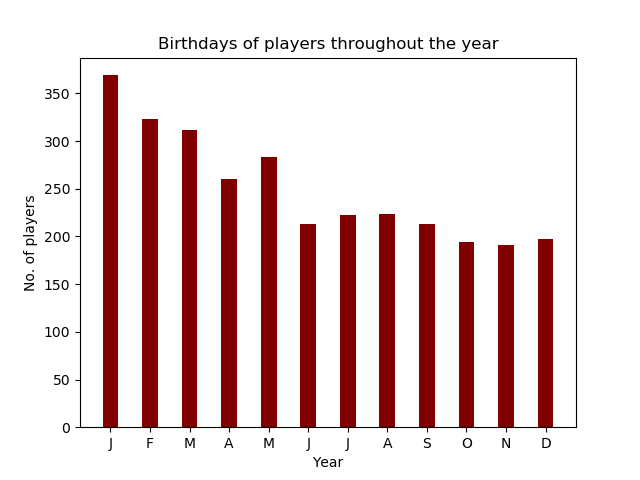
The script plot.py makes use of the pandas library to manage the data, i.e. read the csv file into a pandas dataframe and then use it with further modifications by selecting players from a certain country or the ones that play in a certain league. From the dataframe a list of bins and labels for the X-axis is derived. This depends on how the data is grouped. When the number of players is grouped by each day, you don't yet see the trend of the numbers as easily as when grouped by month or even quarter of the year. I use the latter grouping while talking to a college at work that is a football manager at a local club in some youth league. He told me that the age matters when selecting players for a match. He is not allowed to pick players that are born in one or two quarters of the year. There must be a representation of players that are born throughout the year, although not equally distributed.
Grouping is done by the three methods getBinByDay, getBinByMonth, and getBinByQuarter. From the Birthday
column the year must be removed and the month extracted. If we are grouping by quarter and month only, we may
also forget the day of birth. The month is converted into an integer (bin from 1 to 12) and can be easily divided
by modular 3 (bin from 1 to 4) for the quarter of the year. Only if every day is considered, the bins are 366, each
day of the year has its own bin.
The labels on the X-axis need to display the label for each bin. That is the abbreviation for each month (for 12)
labels, some label for each quarter of an empty list of strings for the days. If we group by day, there are too many
labels to be printed, that is why the first day of the month in the list of labels is filled with a string. For
January 1st this would be xlabels[0], for March first this would be xlabels[60] (31 days of January + 29 days of
February).
The result returned by the method getBinsAndLabels is a list of 2 elements, the bins and the labels for the X-axis.
The latter is simply a list of strings, while the first is a dataframe of dates and the bin where this date belongs
two. For the X-axis we need to transform the long dataframe, basically an array of the line numbers with the bin
number for each line, into a dictionary containing the bin number and a count on how many times this bin appears
in the list of data. After the transformation into an dictionary, the keys are the bin numbers for the X-axis and
the counter is the value for the Y-axis.
The so created data is displayed in a bar chart. The X-axis contains the time (a complete year) ticks are set, depending on the group by statement and labeled accordingly. The Y-axis contains the absolute number of players born in that timeframe. The chart is plotted with the Matplot library.
#!/usr/bin/env python3

"""
Extract and plot information from a CSV file about the birthday of soccer players.
Data is taken from the 5 mayor soccer leagues in Europe (Premier League, La Liga,
Bundesliga, Serie A, and Ligue 1) of the season 2021/22. The data was fetched from
fussballdaten.de. The csv file contains a list of all players in these leagues
including the side and the league where they have a contract with.

Usage: plot.py --file=filename.csv

Mandatory argument
--file=filename.csv
  The csv file that contains the data. Delimiter must be the pipe char.

Optional arguments
--group=quarter|month|day
  When plotting the chart group birthdays of players by quarter of the year, month,
  or day.
--league=bundesliga|seriea|laliga|premierleague|ligue1|all
  Select players from a single league only. Can be combined with --country.
--country=<name>
  Select players from a certain country only. The country name must be given in
  German, because the original data contained this name only. Can be combined
  with --league.
--table
  Instead of plotting a chart, return the data in a table on stdout.
"""

import numpy as np
import pandas as pd
import matplotlib.pyplot as plt
import sys

def getBinByDay(date: str) -> int:
    # days of months, february counts as leap year
    months = [31, 29, 31, 30, 31, 30, 31, 31, 30, 31, 30, 31]
    year, month, day = date.split('-')
    month = int(month)
    if month == 1:
        return int(day)
    i = 0
    bin = 0
    while i < month - 1:
        bin += months[i]
        i += 1
    bin += int(day)
    return bin

def getBinByMonth(date: str) -> int:
    year, month, day = date.split('-')
    return int(month)

def getBinByQuarter(date: str) -> int:
    return ((getBinByMonth(date) - 1) // 3) + 1

def getBinsAndLabels(players: pd.DataFrame, groupby: str) -> []:
    if groupby == 'day':
        bins = players['birthday'].apply(getBinByDay)
        xlabels = [''] * 366
        monthabr = ['Jan', 'Feb', 'Mar', 'Apr', 'May', 'Jun', 'Jul', 'Aug', 'Sep', 'Oct', 'Nov', 'Dec']
        for m in range(1, 12):
            d = getBinByDay('xxxx-' + str(m) + '-1') - 1
            xlabels[d] = monthabr[m - 1]

        return [bins, xlabels]

    if groupby == 'month':
        return [
            players['birthday'].apply(getBinByMonth),
            ['J', 'F', 'M', 'A', 'M', 'J', 'J', 'A', 'S', 'O', 'N', 'D']
        ]

    return [
        players['birthday'].apply(getBinByQuarter),
        ['1st Quarter', '2nd Quarter', '3rd Quarter', '4th Quarter']
    ]

def plot(bins: pd.DataFrame, xlabels: set):
    # transform the long array with bin number for each player to group by bin, using a dictionary
    unique, counts = np.unique(bins, return_counts=True)
    tuple = dict(zip(unique, counts))
    # creating the bar plot
    plt.bar(tuple.keys(), tuple.values(), color = 'maroon', width = 0.4)
    plt.xlabel('Year')
    plt.xticks(np.arange(1, len(tuple) + 1), xlabels)
    plt.ylabel('No. of players')
    plt.gca().yaxis.set_major_formatter(plt.FormatStrFormatter('%d'))
    plt.title('Birthdays of players throughout the year')
    plt.show()

def readCsv(file: str, league: str = '', country: str = '') -> pd.DataFrame:
    players = pd.read_csv(
        file,
        delimiter = '|',
        names = [
            'league_url',
            'league_name',
            'team_url',
            'team_name',
            'player_url',
            'firstname',
            'lastname',
            'birthday',
            'country',
            'position',
        ]
    )
    # filter the data rows by league and or country
    selection = None
    if league == 'bundesliga':
        selection = players.league_name.str.contains('^Bundesliga')
    elif league == 'premierleague':
        selection = players.league_name == 'Premier League'
    elif league == 'laliga':
        selection = players.league_name == 'Primera División'
    elif league == 'seriea':
        selection = players.league_name == 'Serie A'
    elif league == 'ligue1':
        selection = players.league_name == 'Ligue 1'
    if country != '':
        selection = players.country == country
    if selection is not None:
        return players[selection]
    return players

def main():
    groupby = 'quarter'
    league  = 'all'
    country = ''
    table   = False
    file    = None

    for i in range(1, len(sys.argv)):
        arg = sys.argv[i]
        try:
            cmd, val = arg.split('=')
        except:
            cmd = arg
            val = ''

        if cmd == '--help':
            print(__doc__)
            sys.exit(0)
        elif cmd == '--file':
            file = val
        elif cmd == '--group':
            if val in ['quarter', 'month', 'day']:
                groupby = val
            else:
                print('invalid value ' + val + ' for argument --group')
                sys.exit(1)
        elif cmd == '--league':
            if val in ['bundesliga', 'premierleague', 'laliga', 'seriea', 'ligue1', 'all']:
                league = val
            else:
                print('invalid value ' + val + ' for argument --league')
                sys.exit(1)
        elif cmd == '--country':
            country = val
        elif cmd == '--table':
            table = True
        else:
            print('invalid argument ' + cmd)
            sys.exit(1)

    if file is None:
        print('No file name given')
        sys.exit(1)

    players = readCsv(file, league, country)
    if table:
        print(players.to_string(columns = [
            'league_name',
            'team_name',
            'firstname',
            'lastname',
            'birthday',
            'country',
            'position',
        ]))
        sys.exit(0)

    bins, xlabels = getBinsAndLabels(players, groupby)
    plot(bins, xlabels)

if __name__ == "__main__":
    main()
Again, because the data is coming from a german site, you must use the german country names to select the players nationality. Although I did also extract the information of the players position, I did not use it here for the evaluation of the ages because I assume that the sample of players is too small to make out any tendency, e.g. while it matters for goal keepers more, that they are born early in the year because then they are taller than their competitors later of the year, this might not so be important for midfielders or strikers.