Fetch geo data from Wikipedia
Many pages in Wikipedia that deal with an object that can be located at some place on earth usually also has denoted the geographic coordinates where it can be found. This gives a great opportunity of doing questionnaires that involve a map and some dots, that represent some locations.
Let's take for an example the page of the international airport of Gothenburg. In the top right corner there is a link that points to a geo service that displays the location of the object in a map.
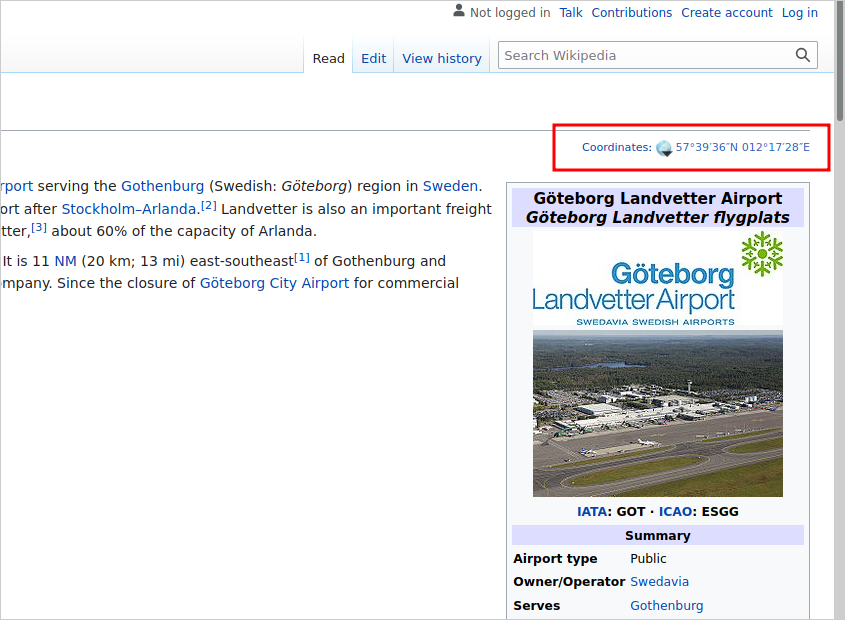
The geo location is framed in red. The corresponding html looks like the following snippet:
<a class="external text"
href="//geohack.toolforge.org/geohack.php?pagename=G%C3%B6teborg_Landvetter_Airport&params=57_39_36_N_012_17_28_E_region:SE_type:airport"
style="white-space: nowrap;">
<span class="geo-default">
<span class="geo-dms"
title="Maps, aerial photos, and other data for this location">
<span class="latitude">57°39′36″N</span>
<span class="longitude">012°17′28″E</span>
</span>
</span>
<span class="geo-multi-punct"> / </span>
<span class="geo-nondefault">
<span class="geo-dec"
title="Maps, aerial photos, and other data for this location">
57.66000°N 12.29111°E</span>
<span style="display:none"> /
<span class="geo">57.66000; 12.29111</span>
</span>
</span>
</a>
The HTMLParser in the Python script looks for an anchor tag with an attribute that
contains the substring geohack.php. If that substing is found, we have the
correct link and may extract the coordinates from the link target. This is done
by pattern matching so that we map the matched parts to coordinates. Unfortunately
the coordinate string 57_39_36_N_012_17_28_E is not usable as in is. There are
one to three digit blocks, separated by an underscore and a trailing N for North or
S for south. The following underscore separated the second block for the longitude.
The blocks from left to right are degrees, minutes, and seconds. The seconds need to be divided by 60 (36 / 60 = 0.6), the result is added to the minutes (39 + 0.6) and the sum again is divided by sixty (39.6 / 60 = 0.66). This delivers the final result that stands right of the decimal delimiter. Then, we concat the degrees with the calculated decimal places and convert the string into a float (57.66). For western latitudes and southern longitudes we need to multiply the resulting float with -1 to get a negative number.
The resulting geojson for the coordinates from the Gothenburg airport looks like this:
{
  "type": "FeatureCollection",
  "features": [
    {
      "type": "Feature",
      "geometry": {
        "type": "Point",
        "coordinates": [
          12.29111111111111,
          57.66,
          0
        ]
      },
      "properties": {
        "name": "G\u00f6teborg_Landvetter_Airport"
      }
    }
  ]
}
The script is a command line tool that can extract coordinates from several pages at once. The script is well documented and self explaining.
#!/usr/bin/env python3
# -*- coding: UTF-8 -*-
"""
This script tries to retrieve geocoordinates from the given Wikipedia article.
The output is written to a file in the geo json format. For each location a
feature of the type point is created which contains the geometry and the name
of the wiki article. If the wiki article does not contain a geolocation
address the output will be empty and no feature is created for that article.
General usage is:
wiki2geojson.py <wiki_url> | <wiki_article> [ --out file.geojson ]
If you want to retrieve the geolocation of the british city of Bristol, the
city could be provided by the complete url from wikipedia
https://en.wikipedia.org/wiki/Bristol or just by the article name Bristol.
You can provide several article names at once, these will be fetched
subsequently and the output will be written into the same file. You may also
provide a local file name with articles listed, that should be fetched. Each
article or the complete wiki url must be on a separate line.
Optional parameters are:
--wiki <url> Base url of the wiki, for the english wikipedia this would
be https://en.wikipedia.org/wiki an article name is added to
that URL automatically.
--out <file> Some file where the geojson result is written to.
--verbose Some verbose output during the script run.
--list List all coordinates that are found on the Page.
--help Print this help information.
"""
import os, sys, re, json
import urllib.request, urllib.parse
from html.parser import HTMLParser
usage = ("Usage: " + os.path.basename(sys.argv[0]) +
" wiki_url|article ... [--out output_file]\n" +
"Type --help for more details."
)
def dieNice(errMsg = ""):
print("Error: {0}\n{1}".format(errMsg, usage))
sys.exit(1)
class MyHTMLParser(HTMLParser):
"""
create a subclass of the HTMLParser to look for the anchor elements
that seem to coordinates set. A typical link looks like:
//geohack.toolforge.org/geohack.php?pagename=G%C3%B6teborg_Landvetter_Airport&params=57_39_36_N_012_17_28_E_region:SE_type:airport
Apparently the coordinates may also be in decimal numbers already like:
//geohack.toolforge.org/geohack.php?pagename=Andernach&language=de¶ms=50.439722222222_N_7.4016666666667_E_region:DE-RP_type:city(30126)
It's not important whats inside the anchor element and where it closes. As
soon as we find on of these we just stop parsing the document any further.
"""
patternNat = re.compile('((\\d+_){1,3})(N|S)_((\\d+_){1,3})(W|E)')
patternDec = re.compile('(\\d+(\\.\\d+)?)_(N|S)_(\\d+(\\.\\d+)?)_(W|E)')
patternMix = re.compile('((\\d+_){2}\\d+\\.\\d+)_(N|S)_((\\d+_){2}\\d+\\.\\d+)_(W|E)')
""" The pattern that matches a geo coordinates string in the href attribute
of an anchor tag"""
matches = []
"""Store here all results that are matched by the regex above throughout the article. Unfortunately
it may happen that there are several geo coordinate links at one page. The one we are looking for
is hopefully the last match because the column on the right side should occur more at the bottom of
the html document."""
spanCoords = -1
""" Mark here the position of the anchor tag that is matched right after the match
of the <span id="coordinates"> tag. This would be the candidate that contains the correct link."""
def strToDec(self, value):
"""Function to convert the pattern XX_YY_ZZ_ into a float value where
XX are the degrees, YY are the minutes and ZZ are the seconds (with a trailing _)
The pattern may also look like XX_YY_ZZ.ZZ. Anyway, from this format we need to convert
it into a decimal number.
Parameters:
value (string): extracted string from the pattern match of latitude or longitude.
Returns:
float: transformed degrees, minutes, and seconds into a float
"""
p = list(filter(lambda item: len(item) > 0, value.split('_')))
sec = float(p[2]) / 60 if len(p) == 3 else 0
min = (float(p[1]) + sec) / 60 if len(p) > 1 else 0
return float(p[0]) + min
def handle_starttag(self, tag, attrs):
"""Function is called when an opening tag is found
Parameters:
tag (string): tag name
attrs (list): list with the attributes of the tag
"""
if tag == 'span':
for attr in attrs:
if attr[0] == 'id' and attr[1] == 'coordinates':
self.spanCoords = len(self.matches)
return
if tag == 'a':
for attr in attrs:
if attr[0] == 'href' and attr[1].find('geohack.php') > -1:
m = self.patternNat.search(attr[1])
if m:
lat = self.strToDec(m.group(1))
if m.group(3) == 'S':
lat *= -1
lon = self.strToDec(m.group(4))
if m.group(6) == 'W':
lon *= -1
self.matches.append({'lat': lat, 'lon': lon})
return
m = self.patternDec.search(attr[1])
if m:
lat = float(m.group(1))
if m.group(3) == 'S':
lat *= -1
lon = float(m.group(4))
if m.group(6) == 'W':
lon *= -1
self.matches.append({'lat': lat, 'lon': lon})
return
m = self.patternMix.search(attr[1])
if m:
lat = self.strToDec(m.group(1))
if m.group(3) == 'S':
lat *= -1
lon = self.strToDec(m.group(4))
if m.group(6) == 'W':
lon *= -1
self.matches.append({'lat': lat, 'lon': lon})
return
def getCoordinates(self):
""" From the matched coordinates try to return the one that is closest to
the span element with id coordinates.
Returns:
dict: lat and lon with floats of the coordinates.
"""
if len(self.matches) == 0:
return {'lat': None, 'lon': None}
if self.spanCoords > -1:
try:
return self.matches[self.spanCoords]
except IndexError:
pass
return self.matches[len(self.matches) - 1]
class WorkLog:
"""
Worklog class to process a list of wiki articles and extract geo
information from a special link, in case it exists.
Attributes:
url (string): with the wiki url, default is https://en.wikipedia.org/wiki/
articles (list): of wiki articles to process
verbose (bool): to output more information during the processing
poi (list): list of dictionaries with lat, lon and name of point
"""
def __init__(self):
self.url = 'https://en.wikipedia.org/wiki/'
""" Default wiki url is from the english Wikipedia"""
self.articles = []
"""List of articles to process is empty at first"""
self.poi = []
"""List of points that have been extracted"""
self.list = False
"""Output the extracted coordinates to stdout, do not write a file"""
self.verbose = False
"""Only report errors but nothing else"""
def setUrl(self, url):
"""Set wiki url from parameter `url` in case later wiki article
names are used only. Then this url is prepended.
Parameters:
url (string): wiki url.
Returns:
self:
"""
self.url = url if url[-1:] == '/' else url + '/'
return self
def addArticle(self, article):
"""Add `article` to list to be processed. This can be a wiki
article name or a complete wiki url
Parameters:
article (string): name or url of wiki article
Returns:
self:
"""
self.articles.append(article)
return self
def setVerbose(self):
"""Enable verbose mode"""
self.verbose = True
return self
def setListOnly(self):
"""Enable list only mode"""
self.list = True
return self
def readFile(self, fname):
"""Read the file with the list of wiki articles.
Parameter `filename` contains the file to read.
Parameters:
filename (string): filename with wiki articles
Returns:
self:
"""
try:
fp = open(fname, "r")
except:
dieNice('could not open file {0}'.format(fname))
for line in fp:
self.articles.append(line.strip())
fp.close()
return self
def process(self):
"""Process the list of wiki articles"""
urlPattern = re.compile('^https?://.*?', re.IGNORECASE)
for article in self.articles:
if urlPattern.match(article):
result = self.fetchCoordinates(article)
else:
if (article.find('%') > -1):
result = self.fetchCoordinates(self.url + article)
else:
result = self.fetchCoordinates(self.url + urllib.parse.quote(article))
if result != False:
self.poi.append(result)
return self
def fetchCoordinates(self, url):
"""Fetch coordinates from a given article url. Parameter `url` contains
the string with the wiki article url. This article is parsed.
Parameters:
url (string): of wiki article that is parsed for the geo link.
Returns:
dict|bool:
False on Failure or a dictionary representing a point.
The dictionary contains the properties "lat" and "lon" of type
float with the coordinates, and a property "name" with
the name of the point. The name is the same as the wiki
article name.
"""
parser = MyHTMLParser()
name = urllib.parse.unquote(url[url.rfind('/') + 1:])
if len(name) == 0:
print("Error: empty article name, skip line")
return False
try:
req = urllib.request.Request(
url,
data = None,
headers = {
'User-Agent': 'Mozilla/5.0 (Macintosh; Intel Mac OS X 10_9_3) AppleWebKit/537.36 (KHTML, like Gecko) Chrome/35.0.1916.47 Safari/537.36'
}
)
fp = urllib.request.urlopen(req)
html = fp.read()
except Exception as e:
print('Error: could not open url {u} Code: {c}, Message: {m}'.format(u = url,c = e.code, m = str(e)))
return False
if self.verbose:
print("Parsing url {0}".format(url))
parser.feed(html.decode('utf-8'))
cntMatches = len(parser.matches)
if cntMatches > 0:
if self.list:
print("Article: {0}".format(name))
for match in parser.matches:
print("Lat: {0} Lon: {1}".format(str(match['lat']), str(match['lon'])))
return False
if self.verbose:
if cntMatches > 1:
print("Warning: found {0} geocoordinates for {1}".format(cntMatches, name))
verb = 'Use'
else:
verb = 'Found'
coords = parser.getCoordinates()
print("{3} location lat: {0} lon: {1} for {2}".format(str(coords['lat']), str(coords['lon']), name, verb))
coords = parser.getCoordinates()
return {'lat': coords['lat'], 'lon': coords['lon'], 'name': name}
if self.verbose or self.list:
print("No location found for {0}".format(name))
return False
def getPois(self):
"""Return the extracted list of points
Returns:
list: with dictionary for each point.
"""
return self.poi
def main():
"""Evaluate the cli arguments, built up the worklog object
with the wiki articles to be processed and build the json
string from the extracted points and write it into a file
or STDOUT."""
# available options that can be changed via the command line
options = ['wiki', 'out', 'verbose', 'list', 'help']
# the output file
outputFile = ''
# the worklo object that does the handling of the wiki articles.
worklog = WorkLog()
# try to fetch the command line args
currentCmd = ''
for i in range(len(sys.argv)):
if i == 0:
continue
arg = sys.argv[i]
if arg[0:2] == '--':
currentCmd = arg[2:]
if not(currentCmd in options):
dieNice("Invalid argument %s" % currentCmd)
if currentCmd == 'help':
print(__doc__)
sys.exit(0)
elif currentCmd == 'verbose':
worklog.setVerbose()
currentCmd = ''
elif currentCmd == 'list':
worklog.setListOnly()
currentCmd = ''
elif len(currentCmd) > 0:
if currentCmd == 'wiki':
worklog.setUrl(arg)
elif currentCmd == 'out':
outputFile = arg
currentCmd = ''
else:
# check if current arg is a file
if os.path.isfile(arg):
worklog.readFile(arg)
else:
worklog.addArticle(arg)
# process the data now
worklog.process()
# create the geojson
geojson = {
'type': 'FeatureCollection',
'features': []
}
# don't output anything when we have no points
if len(worklog.getPois()) == 0:
return
# add each point to the geojson as a feature.
for p in worklog.getPois():
point = {
'type': 'Feature',
'geometry': {
'type': 'Point',
'coordinates': [ p['lon'], p['lat'], 0 ]
},
'properties': {
'name': p['name'].strip().replace('_', ' ')
}
}
geojson['features'].append(point)
# and output the into the file
try:
if len(outputFile) == 0:
fp = sys.stdout
else:
fp = open(outputFile, "w")
except:
dieNice('could not open file %s for writing result' % outputFile)
json.dump(geojson, fp)
fp.close()
if __name__ == "__main__":
main()
""" Changelog
2024-05-18: fix when an article contains already the percent char, assume it's already encoded.
2023-03-04: fix fetching coordinates to support annotation: 46_22_56.42_N_9_54_29.02_E
2023-03-03: add selector for <span id="coordinates"> to better match correct coordinates
when there are several on the page.
2023-02-21: new argument --list to display all the found coordinates on a page.
"""
When I first wrote the script, the html of the wiki page was a little different. During writing this article I tested the script again and noticed that the output remained empty. This was because the string and pattern matching to identify the link with the geographic coordinates has changed since then. Therefore, I needed to adjust the script so that the matching did work again.
Update
When fetching geo coordinates from different pages I noticed that the results were mediocre. That is due to the different formats that are used on the pages and also that there is more than one "geohack" link that contains the coordinates. The first thing was to extend the regular expression patterns to match the different links:
/((\d+_){1,3})(N|S)_((\d+_){1,3})(W|E)/to match strings like57_39_36_N_012_17_28_E/(\d+(\.\d+)?)_(N|S)_(\d+(\.\d+)?)_(W|E)/to match strings like46.382222222222_N_9.9080555555556_E/((\d+_){2}\d+\.\d+)_(N|S)_((\d+_){2}\d+\.\d+)_(W|E)/to match strings like46_22_56.42_N_9_54_29.02_E
The next thing is that e.g. at the german page of the
Piz Bernina
a geographic location is mentioned that refers not to the mountain itself but
to another location that is visible from the peak, but is 349km far away. Depending on
the position in the HTML document where the coordinates are found, you don't really know
whether the correct coordinates were found or not.
Therefore, I had to prioritize the anchor
tags. The most probable link is the closest to a span element with the
id attribute containing the value coordinates. The HTML parser was
extended to match <span id="coordinates"> within the list of found anchor
elements. To debug even further, a new --list argument was introduced
to display all coordinates that were found on the page.
When running the script you always need to verify the locations, that they are correct or at least seem plausible. Without this you may have results that seem correct but in fact are not.
Update 2
When writing the article
4000er summits in the Swiss Alps
I encountered an error, that URLs where double encoded. Imaging the article of the
Täschhorn, when the argument for
the wiki article is Täschhorn everything is good.
The script also allows the wiki link or wiki word as an argument. In this case the "ä" is encoded as "%C3%A4" and the whole argument value contains the percent char. No matter, this was encoded as well and as a resulting URL was not found. Now the
update is to check for a % sign in the URL. If that's the case, it's assumed that the URL is already encoded and the script uses it as it is without encoding it again.