Download images from Wikipedia
Quiz questionnaires look well if there is no text only but also images. In the quiz that I am participating we play 3 rounds of questions. One of these rounds usually contains images and the audience must name what's on it. An example would be a list several known sportsmen like the following:


The audience is asked to write down the name of each president below the image or on a separate sheet with a numbered list. In former times I would check Wikipedia, manually look up each page with the sportsmen that I have on my list, search an image, download it and then use it in the questionnaire. This procedure task that can be automated.
The script can deal with wiki article names, complete wiki urls and take these also from a file. This allows to parse several articles at once and download images. The user may choose whether to download the thumbnail that is shown at the wiki page or the original uploaded image file. The latter may not work for all images because the click on the thumbnail image triggers some Javascript which cannot be done in this Python script.
In case of doubt, the script also may list all images and their caption, so that the user may decide after looking at the listing, which images to download.
Many wiki pages have a box at the right top that summarizes some facts about the entity. Pages about a person have this table with information nearly every time. This table contains facts like birthdate and place, nationality, occupation or why this person is famous for. If the person is famous enough and not just of some B or C prominence, there is also a portrait of that person. This is the image that I want to download. When looking at the structure of the whole website, this image is usually also the first image in the article block. A good guess would be then just download the first image without actually checking the contents until later after downloading a bunch of files. This is also the default behaviour of this script.
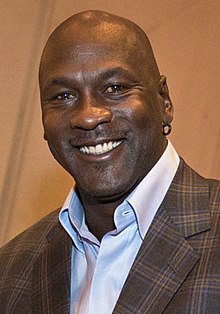
Let's assume I want to fetch the portrait of Michael Jordan. The straight forward approach is this:
./wiki2image.py "Michael Jordan"
By default, article names are looked up in the English Wikipedia. The article name can also be provided in the following ways:
- Michael_Jordan (space to underscore)
- Michael%20Jordan (space url encoded - but not with +)
- https://en.wikipedia.org/wiki/Michael_Jordan (complete url)
This will always download the first image of the article. There are additional options:
--listreturns a list of the image links and the image caption in case there is one--numprovide a number to download some other than the first image, in combination with the list the numbers are shown. To download all images--num allcan be used.--dirwrite the downloaded files into the given directory and not the current one. If the directory doesn't exit it will be created.--origdownload the original image and not the thumbnail.--wikiprovide the wiki base url where the articles are located. This would probably work also with any other Mediawiki installation, although I could not test this yet.
The script is organized in a class WorkLog that does the wiki parsing, extracting information and downloading the images
and in a main routine that handles the command line arguments and sets up a WorkLog instance accordingly.
Before fetching an image I first have to download the wiki article. This is an HTML page with all the image links included.
In the HTML I first have to look for all <img> elements. This is done in WorkLog.fetchImages(self, url).
The url contains the current wiki article url. I need this later. To find the image elements I use the library
BeautifulSoap here.
This is a library that uses some kind of selectors that are similar to css selectors. Instead of looking for the images
directly I look for anchor tags that have a class named image. Images inside an article are always embedded by an anchor
element. This excludes all images that are not part of the article itself. Also, when listing the images, I can better
locate and fetch the image caption.
Inside the anchor element, I now look for the image element. The src attribute contains the link
to the image file. In case of wikipedia the url usually starts with https://upload.wikimedia.org. In this case we
can take the content of the src attribute as it is. In case it's an absolute link without the domain or even a relative
link, I first need to compose the download url from the current website url and path. This is done in
WorkLog.getRealUrl(self, url, imgurl). Therefore, I need the url of the current article that we are parsing.
If the original image is supposed to be downloaded, I just remove the /thumb/ in the path to the image file, in the
hope that this leads to the original image. This is a good guess and works in most of the cases but may fail with svg
files because their thumbnails are jpegs.
To know which image to download, all matches of the parsing with BeautifulSoap must be counted. The class property
WorkLog.download contains a list with the numbers of the images to download. If the list contains one element only,
there are two special cases:
- the element is -1, download all images
- the element is 0, do not download the images but list them only (the list mode that is set with the argument
--list).
In the normal case counting starts at 1 and the occurrence of images is counted and if the element is in the list then the image must be downloaded. By default, the list is filled with the element 1 which means to download the first images that is found in the wiki article.
In case there would be a quiz about US presidents, the approach would be slightly different. Wikipedia already contains a page List of presidents of the United States. Fortunately the page contains a table with each president and also a portrait of him. In this case we tell the script to download all the images at once:
./wiki2image.py https://en.wikipedia.org/wiki/List_of_presidents_of_the_United_States --num all --dir us_presidents
This creates a new directory us_presidents and downloads all images into it. Luckily the file name also contains the
presidents name, so there is no guessing which portrait shows which president after the files have been downloaded. There
are more images on that page, like the US flag, or the coat of arms. These images can be ignored or deleted. Another
good aspect of these images is that if I use the thumbnails, they all have a very similar size which makes it easy to
combine them on a questionnaire.
The whole script follows here. It contains a lot of documentation than make the code size grow. Some parts also deal with comfort, to vary the download modes. Therefore, some command line argument handling is done where the user can set several options. That prevents changes to the script code itself.
#!/usr/bin/env python3
# -*- coding: UTF-8 -*-

"""
This script tries to retrieve one or more images that are embedded in the
given Wikipedia article.

General call is: wiki2image.py <wiki_url> | <wiki_article>

If you want to retrieve an image of Winston Churchill, the article could
be provided by the complete url from wikipedia which is
https://en.wikipedia.org/wiki/Winston_Churchill or just by the article name
Winston_Churchill. You may also write "Winston Churchill" but must enclose
the name with quotes then.

You can provide several article names at once, images of these will be fetched
subsequently. You may also provide a local file name with the articles listed,
that should be fetched. Each article or the complete wiki url must be on a
separate line.

Optional parameters are:
--dir               Set output directory where to store the downloaded images.
--help              Print this help screen.
--list              List all image links that are found on the wiki page. Do
                    not download them.
--num <N>,[<N>]|all number of the image(s) in the article that should be
                    fetched. This is useful when you run --list before which
                    returns an enumerated list of all images found in that
                    wiki article. Several images can be downloaded at once by
                    separating the numbers with comma. Use "all" for down-
                    loading all images at once.
                    By default the first image is fetched.
--orig              Do not fetch the embedded thumbnail image but the original
                    image with the full size (default is thumbnail).
--verbose           Some verbose output during the script run.
--wiki <base url>   Base url of the wiki, for the english wikipedia this
                    would be https://en.wikipedia.org/wiki an article name is
                    added to that URL automatically.
"""

import os, sys, re, json
import urllib.request, urllib.parse
from bs4 import BeautifulSoup

usage = ("Usage: " + os.path.basename(sys.argv[0]) +
         " wiki_url|article\n" +
         "Type --help for more details."
        )


def dieNice(errMsg = ""):
    """Die nice with an error message and return exit code 1"""
    print("Error: {0}\n{1}".format(errMsg, usage))
    sys.exit(1)

class WorkLog:
    """
    Worklog class to download images from a wikipedia page.
    This basically holds all parameters that can be specified on the
    command line and processes an wiki article or a list of articles
    and fetched images.
    """

    def __init__(self):
        """Initialize the object

        Attributes:

        url (string): with the wiki url, default is https://en.wikipedia.org/wiki/
        articles (list): of wiki articles to process
        verbose (bool): to output more information during the processing
        download (list): of integers, which images to download
        mode (string): whether to download the thumbnail or original image

        """

        self.url = 'https://en.wikipedia.org/wiki/'
        """ Default wiki url is from the english Wikipedia"""

        self.articles = []
        """List of articles to process is empty at first"""

        self.verbose = False
        """Only report errors but nothing else"""

        self.download = [ 1 ]
        """Which images to download. By default download the first image
        that we can find. If download is [ -1 ] then download all images
        that are on the wiki page. If download is [ 0 ] then list all image
        urls and caption (if defined) on STDOUT but do not download the
        images"""

        self.mode = 'thumb'
        """By default download the thumbnails. Set it to "orig" to download
        the original image"""

        self.outputDir = ''
        """When set, the dir is created (in case it's not yet there) and all
        downloaded files will be stored in that directory"""

    def setUrl(self, url):
        """Set wiki url from parameter `url` in case later wiki article
        names are used only. Then this url is prepended.

        Parameters:
        url (string): wiki url.

        Returns:
        self:

        """

        self.url = url if url[-1:] == '/' else url + '/'
        return self

    def setDownload(self, num):
        """Set download number which image to download

        Parameter `num` containing a list which images to download.
        If the list is [ 0 ] then list images only. If list is [ -1 ]
        then download all images.

        Parameters:
        num (list): list of integers which images to download

        Return:
        self:

        """

        self.download = num if isinstance(num, list) else [ num ]
        return self

    def setMode(self, mode):
        """
        Set `mode` which image type to download (orig or thumb)

        Parameters:
        mode (string): type of image
        Returns:
        self:
        Exception:
        NameError: if an invalid value is submitted.

        """

        if mode == 'thumb' or mode == 'orig':
            self.mode = mode
            return self
        raise NameError('Invalid argument ' + mode)

    def setOutputDir(self, dir):
        """Set output `dir` where to store the downloaded images.
        If the directory does not exist, it will be created

        Parameters:
        dir (string): name of directory

        Returns:
        self:

        """

        self.outputDir = dir
        return self

    def addArticle(self, article):
        """Add `article` to list to be processed. This can be a wiki
        article name or a complete wiki url

        Parameters:
        article (string): name or url of wiki article

        Returns:
        self:
        """

        self.articles.append(article)
        return self

    def setVerbose(self):
        """Enable verbose mode"""

        self.verbose = True
        return self

    def readFile(self, filename):
        """Read the file with the list of wiki articles.
        Parameter `filename` contains the file to read.

        Parameters:
        filename (string): filename with wiki articles

        Returns:
        self:

        """

        try:
            fp = open(filename, "r")
        except:
            dieNice('could not open file {0}'.format(filename))
        for line in fp:
            self.articles.append(line.strip())
        fp.close()
        return self

    def process(self):
        """Process the list of wiki articles"""

        urlPattern = re.compile('^https?://.*?', re.IGNORECASE)
        for article in self.articles:
            if urlPattern.match(article):
                self.fetchImages(article)
            else:
                self.fetchImages(self.url + urllib.parse.quote(article))
        return self

    def getDataFromUrl(self, url):
        """Get data from a given `url`

        Parameters:
        url (string): url to download

        Returns:
        binary: data that is donwloaded

        """
        try:
            req = urllib.request.Request(
                url,
                data = None,
                headers = {
                    'User-Agent': 'Mozilla/5.0 (Macintosh; Intel Mac OS X 10_9_3) AppleWebKit/537.36 (KHTML, like Gecko) Chrome/35.0.1916.47 Safari/537.36'
                }
            )
            fp = urllib.request.urlopen(req)
            data = fp.read()
            return data
        except Exception as e:
            print('Error: could not open url {u} Code: {c}, Message: {m}'.format(u = url, c = e.code, m = str(e)))
            return False


    def getRealUrl(self, url, imgurl):
        """Get the real url from the image url that is found in the article.

        Parameters:
        url (string): of the article
        imgurl (string): url of the image location inside the article

        Returns:
        string: of the absolute url that can be used to download the image

        """

        if imgurl[0:2] == '//': # just add the protocoll identfier
            return 'https:' + imgurl
        if imgurl[0:1] == '/': # it's an absolute path, add the domain
            return self.url[0:self.url.index('/', 10)] + imgurl
        if imgurl[0:4] != 'http':
            # it's a relative path replace the article name with the real path
            return url[0:url.rfind('/')] + '/' + imgurl
        # it's a complete url with protocol, no need to manipulate it
        return imgurl

    def downloadFile(self, url):
        """Download the content from the given `url` and store it in a file
        that has the same name as on the server (last part of the url).

        Parameters:
        url (string): url to download

        Returns:
        bool: True if download and writing to file was succesful.
        """

        # create output dir in case it does not exist
        if len(self.outputDir) > 0:
            if not os.path.isdir(self.outputDir):
                try:
                   os.mkdir(self.outputDir)
                except OSError:
                   print("Could not create output directory {0}".format(self.outputDir))
                   sys.exit(1)

        # from the last part of the url, take the file name
        name = url[url.rfind('/') + 1:]
        # and download the data
        data = self.getDataFromUrl(url)
        # we downloaded something
        if data != False and len(data) > 0:
            try:
                # try to save it in the dir and file
                fullpath = name if len(self.outputDir) == 0 else self.outputDir + '/' + name

                fp = open(fullpath, "w+b")
                fp.write(data)
                fp.close()
                if self.verbose:
                    print("Image downloaded successfully and stored in {0}".format(name))
                return True
            except:
                print("Error: could not store data into file {0}".format(name))
        return False

    def fetchImages(self, url):
        """Fetch images from a given article url. Parameter `url` contains
        the string with the wiki article url. This article is parsed and all
        image links are extracted.

        Parameters:
        url (string): of wiki article that is parsed for image links.

        Returns:
        bool: Success or Failure

        """

        name = url[url.rfind('/') + 1:]
        downloadSuccess = True

        if len(name) == 0:
            print("Error: empty article name, skip line")
            return False

        html = self.getDataFromUrl(url)
        if html == False:
            return False

        if self.verbose:
            print("Parsing url {0}".format(url))

        soap = BeautifulSoup(html.decode('utf-8'), 'html.parser')
        cnt = 0
        for aimage in soap.select('.infobox-image, figure'):
            cnt += 1

            # check if we have selected a single image > 0
            if len(self.download) == 1  and self.download[0] > 0 and self.download[0] != cnt:
                continue
            # we do have a list, check if the current image is in the list that we want to have
            if len(self.download) > 1:
                try:
                    self.download.index(cnt)
                except:
                    continue;

            # proceed with downloading the image
            imgurl = aimage.find('img').get('src')
            if self.mode == 'orig':
                imgurl = imgurl[0:imgurl.rfind('/')].replace('/thumb/', '/')

            # list only but do not download the image, therefore look for the image caption
            if self.download[0] == 0:
                alt = aimage.find('img').get('alt')
                if alt is None or len(alt) == 0:
                    caption = aimage.find('figcaption')
                    if caption is not None:
                       alt = caption.get_text()

                if len(alt) > 0:
                    print("{0}: {1}\n\t{2}\n".format(cnt, self.getRealUrl(url, imgurl), alt))
                else:
                    print("{0}: {1}\n".format(cnt, self.getRealUrl(url, imgurl)))

                continue
            # download the current image, list is eigther [ -1 ] for all images
            # or we just happen to habe cnt being in the list of images to download.
            downloadSuccess = self.downloadFile(self.getRealUrl(url, imgurl))

        return downloadSuccess


def main():
    """Evaluate command line arguments, build up worklog and start
    processing the wiki articles"""

    # available options that can be changed via the command line
    options = ['wiki', 'orig', 'num', 'list', 'verbose', 'help', 'dir']

    # the worklog that handles the wiki articles and processes them.
    worklog = WorkLog()

    # try to fetch the command line args
    currentCmd = ''
    for i in range(len(sys.argv)):
        if i == 0:
            continue
        arg = sys.argv[i]
        # we have a command identified by -- remember it in currentCmd
        # in case this command needs an argument, or just set the
        # appropriate parameter in the worklog or execute some action
        if arg[0:2] == '--':
            currentCmd = arg[2:]
            if not(currentCmd in options):
                dieNice("Invalid argument %s" % currentCmd)
            if currentCmd == 'help':
                print(__doc__)
                sys.exit(0)
            elif currentCmd == 'verbose':
                worklog.setVerbose()
                currentCmd = ''
            elif currentCmd == 'list':
                worklog.setDownload(0)
                currentCmd = ''
            elif currentCmd == 'orig':
                worklog.setMode('orig')
                currentCmd = ''
        # we have an argument, what was the previous command, do this
        # action in the worklog.
        elif len(currentCmd) > 0:
            if currentCmd == 'wiki':
                worklog.setUrl(arg)
            elif currentCmd == 'num':
                if arg.find(',') > -1:
                    collection = []
                    for num in arg.split(','):
                        collection.append(int(num))
                    worklog.setDownload(collection)
                elif arg == 'all':
                    worklog.setDownload(-1)
                else:
                    worklog.setDownload(int(arg))
            elif currentCmd == 'dir':
                worklog.setOutputDir(arg)
            currentCmd = ''
        else:
            # check if current arg is a file
            if os.path.isfile(arg):
                worklog.readFile(arg)
            else:
                worklog.addArticle(arg)

    # process the data now
    worklog.process()

if __name__ == "__main__":
    main()